The internal rate of return (IRR) is the annual growth rate an investment is expected to generate — precisely, the discount rate that makes the net present value of every cash flow equal zero. Enter your initial investment and the cash flow for each period in the calculator above to get your IRR instantly. A project is worth pursuing when its IRR exceeds your hurdle rate.
What is IRR

IRR stands for internal rate of return.The IRR is the interest rate (also known as the discount rate) that makes the NPV (Net Present Value) of all cash flows (both positive and negative) from a project or investment equal to zero. For instance, the investment's IRR is 25%, which is the rate that makes the net present value of the investment's cash flows equal to zero. It's an important financial metric often applied to analyse the desirability of a potential investment or a project. The higher IRR of an undertaken project indicates more worth pursuing and expected to give good return in future. IRR is sometimes also called as ERR or economic rate of return.
IRR Calculation Formula
IRR or internal rate of return is calculated in terms of NPV or net present value. So, the formula for calculating IRR is same as NPV. Where NPV value is equal to zero.

Where in the above formula :
N = total number of periods
n = positive integer
C = cash flow
r = internal rate of return
NPV = net present value
Read more: IRR Formula
How to Calculate IRR with example
Suppose a company plans to invest in a project with initial investment amount of $10000. The expected net cash flow for three years are to be $4500,$4000 and $5500 repectively. Let's calculate the internal rate of return for these period.
So the formula would be :
0 = C1/(1+r) + C2/(1+r)2 + C3/(1+r)3 - initial investment
After putting value in above equation, here's how the IRR equation looks:
0 = 4500/(1+r) + 4000/(1+r)2 + 5500/(1+r)3 - 10000
In this case, the r is 0.182, which makes IRR as 18.2%
Let's suppose the company is getting 10% return in other investment, then in the financial standpoint, the company must pursue this project which is likely to yield higher return of 18.2%.
Read more: Calculation of IRR in Excel
IRR decision criterion
The general IRR decision rule is, if IRR of a project is greater than the company's minimum acceptable rate of return then the project should be taken. But if the IRR falls below the minimum acceptable rate of return then the project should be dropped. When comparing different projects, IRR can help us determine the project's likelihood of profit in future. A project with higher IRR should be given more weightage than project with lower IRR.
IRR uses
IRR is used to evaluate desirability of a project or investment. Assuming all project require same up-front investment then the one with higher IRR is considered as desirable.
IRR plays good role in stock buyback programs inside big corporations. It shows if the investment in company's own stock is better than any other outside investment or use of the capital.
Limitations of IRR
IRR should not be used to decide the mutually exclusive projects but to decide if a single project is worth pursuing.
Other limitation of IRR is that all cash flows are assumed to be re-invested at same rate but in real world this may change over long term.
IRR shouldn't be used to compare projects of different durations. A project of shorter duration may have higher IRR than the project of longer duration.
About IRR Calculator
Calculating IRR (internal rate of return) can sometimes become too complex. You can use special financial calculators (like,Ti-83,Ti-84 and HP 12c calculator) or programs like Excel. IRR Calculator is one such free online tool to calculate the internal rate of return of an investment. To calculate IRR just fill in the initial investment amount followed by the net cash flow (negative or positive) in each period and then click on calculate button to get the IRR result .
How to calculate IRR using this calculator
If you are using this calculator for the first time then you might need to understand that how this calculator works for calulating IRR or internal rate of return.
In the given calculator above, if your cash flow number(i.e, period) is more than 5 times then you can add more period by simply hitting the "Add Period" button and if it's lesser then 5 times then you can delete the number of period by clicking on "Delete Period" button.
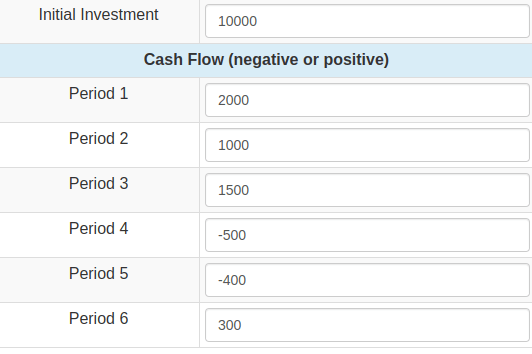
Here's an example of cash-flow statement provided in table below which can be used for inputing the value in the given calculator above. Let the initial investment be $10000. The initial investment can be called as "Period 0" investment.
| Cash-flow Table | |
|---|---|
| Period | Amount |
| Initial Investment(Period 0) | $10000 |
| Period 1 | $2000 |
| Period 2 | $1000 |
| period 3 | $1500 |
| period 4 | $-500 |
| period 5 | $-400 |
| period 6 | $300 |
The above information in the table can be used to enter the value in the calcualtor input field. As it has total 7 number of cash flows including initial investment. So, use the "Add button" to add extra cash flow field.
Here' the example picture of calculator field. To get the value of IRR, simply click calculate button which will take you to the next page showing the result.
How this calculator works
Accuracy matters more than speed in financial tools, so it is worth being explicit about the method. This
calculator solves for the rate r that makes the net present value of your cash flows equal zero,
using the same numerical root-finding approach as the IRR function in Microsoft Excel and
Google Sheets. For identical inputs it returns identical results.
- Your initial investment is treated as a negative cash flow at period 0, and each subsequent value as the net cash flow at the end of that period.
- When no real solution exists, the calculator reports an error instead of returning an approximate or misleading rate.
- Nothing you type is stored or transmitted; the calculation runs on our server and the inputs are discarded once the result is rendered.
You might like Our Other Financial Calculators
Free online tools from our finance calculator network